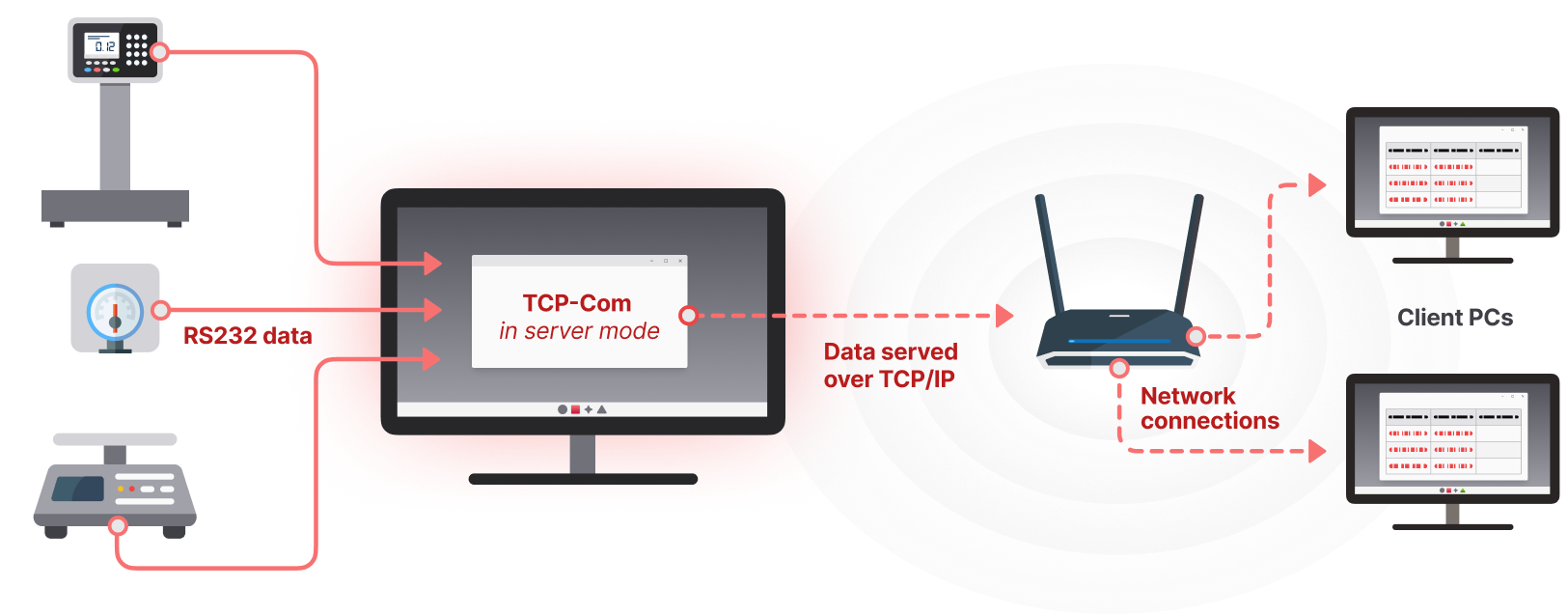
A virtual COM port is a virtual serial port that functions as a physical RS232-based port except that it operates through a network instead of a cable. It allows computers and other devices to communicate through TCP/IP as though they were united. This is applicable in cases when the serial device is too far or when your computer does not physically have a COM port.
Using such a tool as Aggsoft TCP-Com, a virtual COM port can be easily and effectively configured. The software builds a connection between the serial and network communications, thus connecting legacy serial devices to the modern applications without additional hardware.
What is the need for Virtual COM Ports in Businesses?
The equipment that is still being relied upon by many organizations relies on serial communication, such as barcode scanners, data loggers, sensors, and controllers. Nonetheless, classic COM interfaces are frequently absent in modern systems. That is where virtual COM ports come in.
They do not make any changes to your existing software, which means that it will keep working. You do not have to insert a cable into your PC; instead, it connects via a virtual COM port via the network. This will not only save time but also minimize the maintenance expenses, as well as allow the management of the remote devices anywhere.
What does TCP-Com do to make the setup process easier?
Conventionally, it takes a serial-to-network connection to be coded, drivers installed, or other special hardware. All these barriers are eliminated by TCP-Com. The setup procedure is not technical and does not require a user with technical skills.
Here’s how it works:
- Install TCP-Com: Download and install the program on your computer.
- Install a New Port: The software interface allows one to create a virtual COM port.
- Enter Network Information: Enter the IP address and TCP port number of the system or device across which the device is to be connected.
- Save and Connect: Your virtual COM is now ready to communicate with the remote device.
Any application that would have normally linked to a nearby COM port is configured to automatically transmit data over TCP-Com to the networked device. You do not have to revise your application code or alter your setup every time.
What are the most important benefits of using TCP-Com?
TCP-Com has several strengths that render it outstanding:
- No coding necessary: Works with current software.
- Cross-network compatibility: LAN, WAN, and internet-based communication.
- High reliability: Able to support consistent data transmission even over extensive distances.
- Multi-device support: Allows you to connect and monitor a number of serial devices simultaneously.
- Basic troubleshooting: The interface offers simple monitoring of all the data traffic.
Such simplicity and flexibility also contribute to the fact that TCP-Com can be used in almost any industry, such as manufacturing, logistics, energy, and automation, in which the flow of data is essential.
Why use Aggsoft TCP-Com to manage a Virtual COM Port?
Aggsoft TCP-Com is one of the most efficient tools to use in terms of stability and having a simple way to manage the communication between the serial and the network. It is time-saving due to its ability to automatically handle intricate processes and ensure that your devices are not disconnected.
It is easy to configure the software since its interface is intuitive and can be completed by non-technical users. You might need to have a single device to be connected or a complete network of serial systems. TCP-Com will provide a reliable solution, which will fit well with the structure of your network.
What Do You Need to do to Start TCP-Com?
Getting started is simple. Download TCP-Com from the Aggsoft website, install it, and follow the step-by-step configuration instructions. A few minutes later, you will be able to use a fully functional virtual COM port to communicate through the serial port in your network.
TCP-Com provides you the ability to update your system and systems without the use of cables and hardware converters by simplifying your infrastructure to a couple of clicks, alongside still using your older hardware and ensuring it is operational and effective at the same time.
